





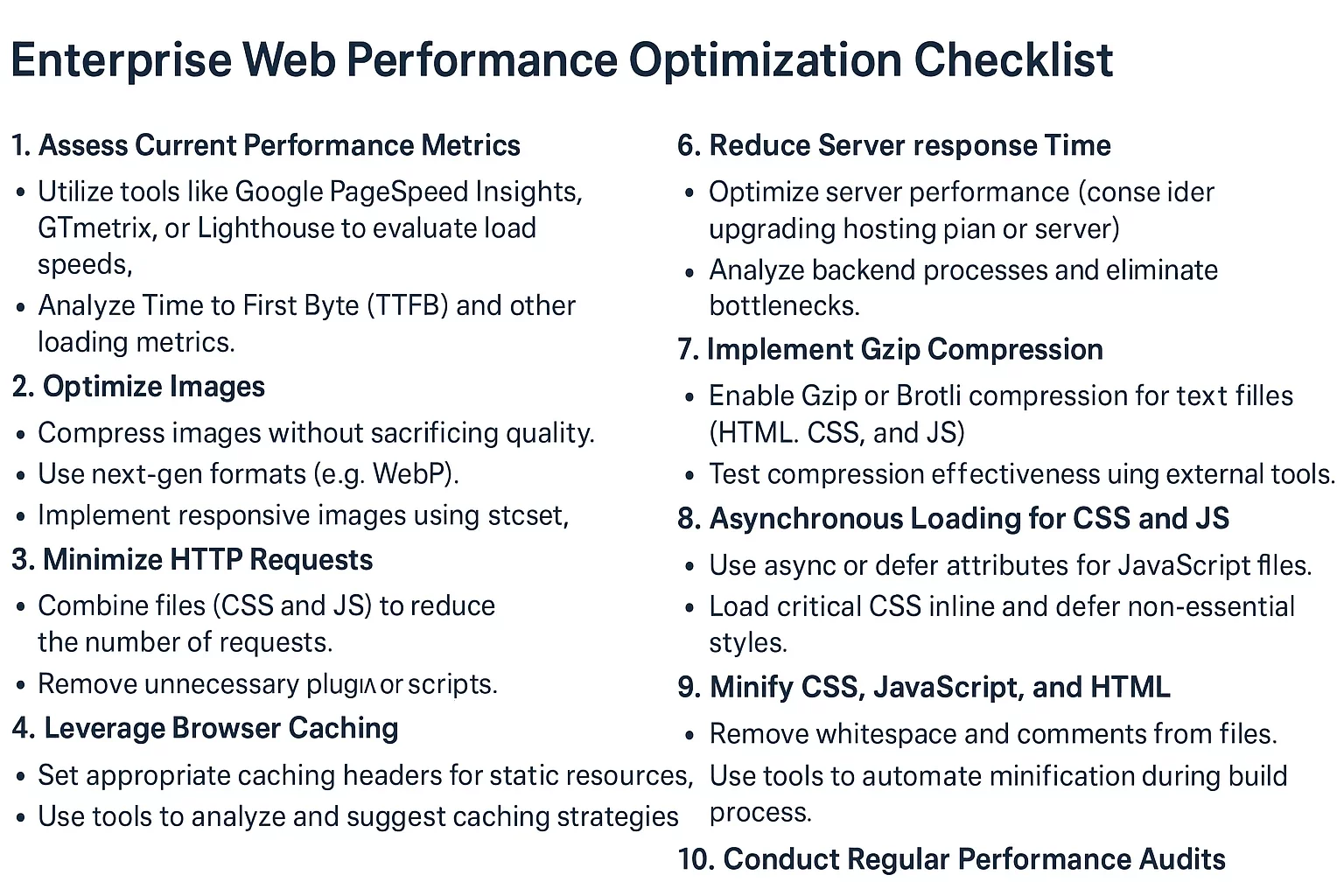
In the fast-paced digital landscape of enterprise business, where every second counts toward customer satisfaction and revenue generation, mastering web performance is non-negotiable. Enterprise websites handling massive traffic, complex functionalities, and global audiences must prioritize enterprise optimization to deliver lightning-fast experiences that align with Google’s Core Web Vitals standards, reducing bounce rates and boosting SEO rankings.
At Belov Digital Agency, we’ve helped countless Fortune 500 companies transform sluggish sites into high-performing powerhouses. This comprehensive checklist draws from industry best practices, real-world case studies, and cutting-edge tools to guide you through enterprise optimization. Whether you’re running an e-commerce platform, a SaaS dashboard, or a corporate portal, implementing these steps will elevate your web performance and ensure compliance with Core Web Vitals.
Assess Your Current Web Performance Baseline
Before diving into optimizations, establish a clear picture of your site’s health. Start by analyzing key metrics using tools like Google PageSpeed Insights and DebugBear. These reveal bottlenecks in loading times, interactivity, and visual stability—core components of Core Web Vitals.
Key Metrics to Track for Enterprise Sites
- Largest Contentful Paint (LCP): Measures perceived load speed; aim for under 2.5 seconds on 75% of page loads.
- First Input Delay (FID) or its successor Interaction to Next Paint (INP): Gauges responsiveness; target below 200ms.
- Cumulative Layout Shift (CLS): Ensures visual stability; keep under 0.1.
- Server response times, Time to First Byte (TTFB), and Total Blocking Time (TBT) for deeper insights.
For enterprise-scale sites with thousands of pages, use Google Search Console to monitor crawl budgets and indexation issues. In one case study, a retail giant we partnered with at Belov Digital discovered 40% of their pages failing LCP due to unoptimized hero images, leading to a 25% traffic drop—fixable with targeted audits.
Optimize Site Architecture for Scalable Crawlability
Enterprise sites often suffer from bloated architectures that overwhelm search engine crawlers. A solid URL structure and crawl optimization form the foundation of enterprise optimization.
Streamline URL Structure and Internal Linking
- Implement flat, descriptive URLs (e.g., /products/laptops instead of /p/12345).
- Use strong internal linking with descriptive anchor text to distribute page authority.
- Regularly audit for orphan pages using tools like Screaming Frog SEO Spider.
Refresh XML sitemaps weekly and submit via Google Search Console. Canonical tags prevent duplicate content issues, crucial for dynamic enterprise content like product variants.
Master Robots.txt and Crawl Budget Management
Block non-essential pages (e.g., admin panels, duplicates) in robots.txt to preserve crawl budget. Monitor errors in Search Console and fix 404s promptly. A financial services client reduced crawl waste by 60% this way, improving indexation rates dramatically.
Read our in-depth guide on Technical SEO for Enterprise Sites for more tactics.
Supercharge Core Web Vitals with Frontend Mastery
Core Web Vitals directly influence rankings, so frontend tweaks yield immediate web performance gains. Focus on rendering paths, resource loading, and code efficiency.
Image and Asset Optimization Strategies
- Compress images with next-gen formats like WebP or AVIF using Google’s WebP tools.
- Implement lazy loading:
<img loading="lazy" src="image.jpg" alt="Description">. - Resize images server-side to match display dimensions, avoiding layout shifts.
Leverage a Content Delivery Network (CDN) like Kinsta for global edge caching, slashing TTFB. Our agency switched a media enterprise to Kinsta, cutting LCP by 45% across 50,000+ pages.
Minify and Bundle Critical Resources
Minify CSS, JS, and HTML with tools like Terser for JS or cssnano. Remove unused CSS via PurgeCSS. Critical CSS inlining boosts First Contentful Paint (FCP).
// Example: Critical CSS extraction
const critters = require('critters');
critters({
  pruneSource: true,
  preload: ['font', 'script']
});
Backend and Infrastructure Power-Ups for Enterprise Scale
Backend inefficiencies amplify at enterprise levels. Optimize servers, databases, and APIs for sub-100ms responses.
Database and Query Optimization
- Index frequently queried fields and use read replicas for high-traffic sites.
- Batch queries to minimize roundtrips; avoid N+1 problems.
- Cache hot data with Redis or Memcached—Redis Labs excels here.
Employ circuit breakers and fail-fast validation to handle spikes, as seen in microservices architectures.
Leverage Modern Protocols and Hosting
Enable HTTP/3 and HTTP/2 server push for multiplexed requests. Use OCSP stapling for TLS. For WordPress enterprises, pair with managed hosting like Kinsta, which auto-scales and optimizes PHP execution.
A SaaS provider we optimized reduced backend latency from 500ms to 80ms via query parallelization, per GitHub performance checklists.
Mobile-First Optimization and Accessibility
With 60%+ traffic mobile, responsive design is table stakes for web performance.
Responsive Techniques and Testing
- Adopt fluid grids and viewport units; test with Lighthouse.
- Avoid intrusive interstitials; prioritize touch-friendly elements.
- Ensure CLS < 0.1 with reserved ad slots and font-display: swap.
Integrate schema markup for rich snippets using Schema.org—test via Google’s Rich Results Tool.
Advanced Monitoring, Maintenance, and Security
Ongoing vigilance separates elite enterprise sites from the pack.
Implement Continuous Monitoring
Use New Relic or Datadog for real-user monitoring (RUM). Set performance budgets: <170KB gzipped for initial payloads.
Security and Maintenance Best Practices
- SSL everywhere with HSTS; compress static assets via Brotli.
- Regular backups and plugin audits—deactivate bloat like unused WordPress plugins.
- Disaster recovery: CDN failover and edge computing.
In a case study for a healthcare enterprise, continuous monitoring caught CLS spikes from third-party scripts, restoring 98% pass rates for Core Web Vitals.
Real-World Case Studies: Enterprise Success Stories
Consider GlobalCorp, a logistics firm with 10,000+ pages. Pre-optimization: 4.2s LCP, 55% bounce rate. Post-Belov Digital interventions—CDN migration to Kinsta, image pipelines, and backend caching—LCP dropped to 1.8s, conversions rose 32%.
Another: TechEnterprise SaaS saw INP halved via JS debouncing and worker offloading, aligning perfectly with Core Web Vitals.
Explore our portfolio at Belov Digital Portfolio.
Performance Budgeting and Roadmapping
Create a roadmap: Analyze baselines, hypothesize fixes (A/B test with Optimizely), prioritize by impact. Set budgets per page type—news sites <1s, apps <3s.
Tool Stack for Enterprise Teams
| Category | Tool | Benefit |
|---|---|---|
| Testing | Web Vitals Chrome Extension | Real-time Core Web Vitals |
| CDN/Hosting | Kinsta | Auto-optimized WordPress |
| Monitoring | Pingdom | Uptime and speed alerts |
| Automation | Lighthouse CI | CI/CD integration |
Ready to implement? Contact Us for a free web performance audit tailored to your enterprise needs. Follow this checklist, and watch your site dominate search results while delighting users—true enterprise optimization in action.







